Listens to both sides
Separate microphone and system-audio channels distinguish your voice from the interviewer and build a live transcript as you talk.
Live two-speaker transcription, resume-grounded answer coaching, coding help, and on-demand screen context in one focused workspace.
Free includes two lifetime sessions of up to 15 minutes each. Paid plans include 300 to 1,200 live minutes each month.
Tell me about a time you aligned technical and business teams around a difficult product decision.
I’d start with the customer impact…
Lead with the shared outcome.
“In my last role, engineering and sales disagreed on whether to delay a release for an enterprise request. I reframed the decision around customer risk, revenue, and the cost of a rushed implementation…”
Keep the conversation, your selected application context, and the help you need together—without bouncing between notes and chats.
Separate microphone and system-audio channels distinguish your voice from the interviewer and build a live transcript as you talk.
Choose an application and Copilot uses the matching resume, job, interview type, language, and preferences to shape useful answers.
Conversational turn detection recognizes a completed question and starts streaming an answer without making you stop to copy and paste.
These screens come from the shipping Windows release. Personal application details were removed from the examples.
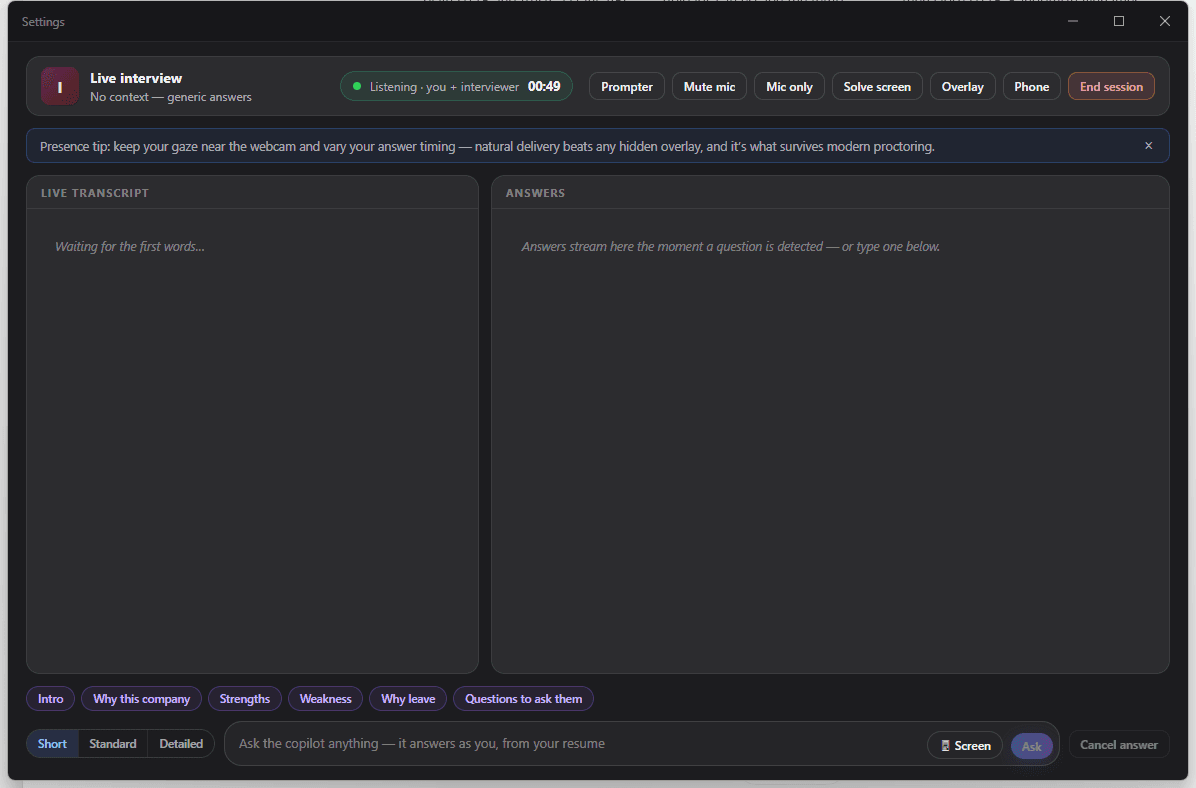
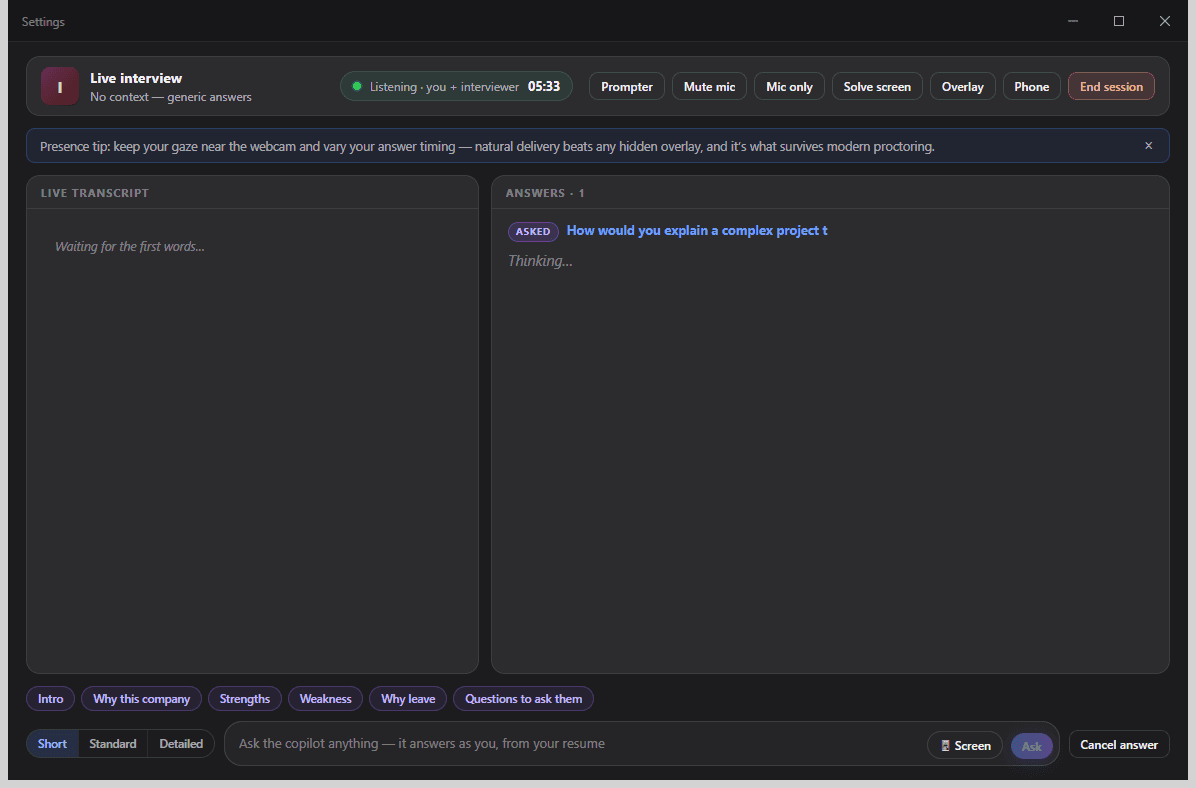
Ask manually, use quick prompts, change answer detail, mute your mic, switch audio capture, or cancel an answer instantly.
Get an approach, syntax-highlighted code, complexity, tests, and optimization—or ask about a prompt visible on your screen.
Keep the current answer in a compact always-on-top view and control visibility, position, click-through, and answer length globally.
Mirror answers to a phone on the same trusted Wi-Fi using a protected local connection and a short-lived pairing code.
Practice tailored questions by voice or text, hear the interviewer aloud, and receive a score, feedback, an ideal answer, and delivery metrics.
Review questions, answers, delivery, and AI coaching after a session; save useful stories and notes for the next interview.
Coding, screen context, overlay, phone companion, and the included live-session debrief are available on every tier. Plans differ by session allowance—not by feature access.
Up to 15 minutes per session
Up to 120 minutes per session
Up to 120 minutes per session
Up to 120 minutes per session
Live answers, screen context, and one cached debrief per session use the Copilot allowance—not generic AI credits. A setup-only session that ends before its first answer and before 60 seconds of transcription consumes no allowance.
Compare Resumly plansSign-in tokens, saved sessions, memory, and preferences use Windows-protected encryption on this device.
Get the Windows x64 installer.
Verify the checksum, then complete setup.
Use the normal Resumly login—no embedded desktop password form.
Confirm microphone and interviewer capture before the call.
Interviews are the one part of a job search where preparation and performance come apart. You can know your own work completely and still lose the thread of a question halfway through answering it. The pressure is not a knowledge problem. It is a working-memory problem: you are listening, recalling, structuring, and speaking at the same time, on a clock, while being evaluated.
Most preparation tools help with the first part and abandon you at the second. You get question lists, sample answers, maybe a mock session with feedback afterwards. All of it happens before the interview. None of it is present during the twenty seconds where you have been asked something you half-expected and need a structure to hang the answer on.
Resumly Copilot is built for that gap. It listens to the live conversation, recognises when a question has finished, and streams a structured answer grounded in your own resume and the specific job you applied to — while you are still deciding where to begin.
A general-purpose chatbot answering “tell me about a time you handled conflict” gives you a competent, anonymous answer about a person who is not you. That is worse than useless in an interview, because you then have to improvise a real example while reading someone else’s words.
Copilot starts from a specific application: the resume you tailored for that role, the parsed job description, the interview type, and the language you want to answer in. Suggestions reference your actual roles and projects, in the register the posting uses, so what appears on screen is a prompt for your own memory rather than a script for someone else’s.
Copilot captures microphone and system audio on separate channels at the Windows level, so it can tell your voice from the interviewer’s and build a two-speaker transcript as you talk. Because the capture happens at the operating-system level rather than inside a specific meeting app, it works alongside Zoom, Google Meet and Microsoft Teams without configuring any of them.
That separation is what makes turn detection possible. Copilot can tell a finished question from a pause mid-sentence, and starts composing at the moment the interviewer stops — typically under a second to the first word — instead of waiting for you to copy text into a chat window.
Technical interviews break the pattern: the question is on a shared editor, not in the audio. Coding mode returns an approach first, then syntax-highlighted code, complexity, test cases and an optimisation pass, so you can talk through your reasoning rather than silently typing. On-demand screen context covers the rest — a take-home prompt, a system-design canvas, a spreadsheet the interviewer has shared — by reading what is visible when you ask.
An answer is only useful if reading it does not look like reading. The overlay keeps the current answer in a small always-on-top panel with global shortcuts for visibility, position, click-through and answer length, so you can keep the meeting window where it is. If you would rather not have anything on the interview screen at all, the phone companion mirrors answers to a handset on the same trusted Wi-Fi over a protected local connection with a short-lived pairing code.
The live mode is the visible half. Practice mode generates questions tailored to a specific application, reads them aloud, accepts voice or typed answers, and scores each one with narrative feedback, an ideal answer for comparison, and delivery metrics such as pace and filler words. After a real session, the debrief lays out the questions you were actually asked, what you said, how you delivered it, and where to tighten — and lets you save the stories that worked so they are available next time.
Sign-in tokens, preferences, session history, saved memory and active-session state are stored on your own machine using Windows-backed encryption. Local history defaults to 30-day retention, and you can clear session history or erase all local app data from Settings whenever you want. Signing in happens in your normal browser and hands back through a short-lived one-time token, so your password is never typed into an embedded desktop window.
Copilot is an assistance tool, and some interviews prohibit assistance tools. Employers set their own rules, and those rules vary by company, role and round. Read them, follow them, and disclose where disclosure is expected. Used within them, the tool is at its best where it is least dramatic: keeping you oriented, surfacing the example you already lived through, and letting you spend your attention on the conversation rather than on remembering.
The installer is not code-signed yet, so Windows SmartScreen shows its standard warning for publishers it does not recognise. Download only from Resumly, compare the SHA-256 below, then choose More info and Run anyway.
Local history defaults to 30-day retention. Clear session history or erase all local app data from Settings whenever you choose.
BB54F90A044BAE7C835EDA52D9D5449666C5F2ED9FA3B109B9AE5A95592CA4EFPlans and allowances, sign-in, privacy, SmartScreen, meeting apps, and macOS.
Start with the full toolkit—even on a Free account.
Download for WindowsVersion 1.0.11 · 64-bitMicrosoft and Windows are trademarks of the Microsoft group of companies.



© 2026 Resumly.AI. All rights reserved.
© 2026 Resumly.AI. All rights reserved.
